How is the OS organized?
Architecture of an Operating Sytems
Kernel vs Shell
Most operating system are made up of two important parts: - The Kernel - The Shell
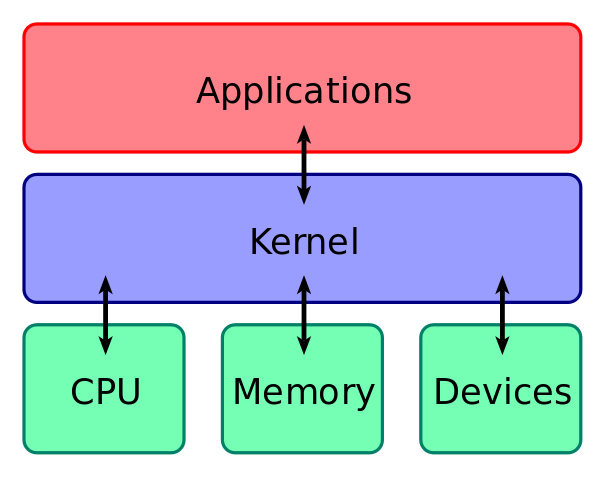
The Kernel is the innermost part of the operating system and it is responsible for controlling the computer hardware components. It interacts with the devices such as the processor, the main memory, the storage devices, the inputs devices, output devices and communcation devices. It talks to the hardware through device drivers (small programs that connect the OS to each device) and keeps the system stable and running smoothly.
You can think of the OS an air traffic controller at a busy airport. Where the programs running are like the airplanes and the hardware are the gates, runways, various terminals. The traffic controller must carefully coordinate takeoffs and landings, allocating runway space and assigning gates to the various airplanes going through. It’s must avoid collisions!

The Shell is the part of the operating system that lets the user interact with its functions. This can be done in two ways:
Through a Graphical User Interface (GUI) — often called “Gooey” — using windows, icons, and menus.
Through a Command-Line Interface (CLI) — by typing commands that the OS understands.
These typed commands are converted into binary instructions by the command interpreter, so the computer can execute them.
Examples of command-line shells include:
Bash – used in Linux, macOS, and other Unix-based systems
Cmd – used in Windows (used to be MS-DOS)
Program, process versus thread
You might hear these terms used interchangeably, but they aren’t the same and you’ll learn them in more depth in your Operating Systems course next year.
A program 📜 is a set of instructions written by a programmer like you. It runs when the operating system loads it into memory. You can have several instances of the same program running at once, each one is a separate process.
A process ⚙️ is one active instance of a program running in memory (RAM). Each process works independently and has its own memory space. The OS keeps track of them using a unique process ID (PID).
A thread 🧵 is a smaller unit of work inside a process. Threads let a process perform multiple tasks at the same time, just like CPU threads let the OS run several software threads simultaneously for multitasking. This will not be part of any evaluation in this course, but it’s still useful to understand when you start developing apps and web apps.

Imagine the Operating System as the head chef in a busy restaurant, with several sous-chefs working under him. All the recipes—written 📜 by programmers are stored in a large file cabinet (the storage device).
When a customer orders a cake, the chef (OS) retrieves the recipe, assigns it to a sous-chef, and provides the necessary ingredients, an oven (CPU), and a workspace (RAM) ⚙️
To speed things up, the chef can assign assistants to help the sous-chef, each handling smaller tasks in parallel 🧵, all sharing the same resources.
OS and the CPU
How the OS speaks to the CPU, RAM and storage is a complex process and is out of scope for this course, but it’s useful to build a mental picture to to tie-in all the knowledge we’ve learned for far.
At this stage, you know that the CPU is an incredibly complex network of transistors linked by wires to the RAM. These connections allow the CPU to fetches instructions and data by reading specific addresses and values from memory. It then decodes them using its built-in codebook. The clock determines how often the CPU executes instructions, all happening in binary, where each transistor is either ON (1) or OFF (0).
When a computer boots up, the BIOS (after the POST and hardware initialization) takes control of the CPU, and loads the Operating system. The OS will ten take control of the CPU to perform. When an app/program is launched, the operating system reserves space in RAM and loads the program’s machine code (binary intructions) into that space. It then updates the CPU’s program counter (a special register) to the starting address of the program in memory, this is what starts the execution of a program. In other words, the OS is the true brains of the computer and uses the CPU as its high speed calculator!
The OS also frequently switches the CPU’s focus from one program to another, creating the illusion of multitasking. In reality, the CPU is performing rapid task switching, handling one task at a time but so quickly that it feels simultaneous.
OS and RAM
The OS’s most important function is to manage the memory (RAM), more specifically it’ll allocate space in the RAM for various programs to run. Before diving into this process, let’s take a look at how memory is organized.
Every RAM stick is made of millions of memory cells organized as a matrix as learnt in the hardware module. To read/write to those cells, special circuitry connected to embedded wires called address lines can precisely access each “group” of 8 bits (1 byte) of data.
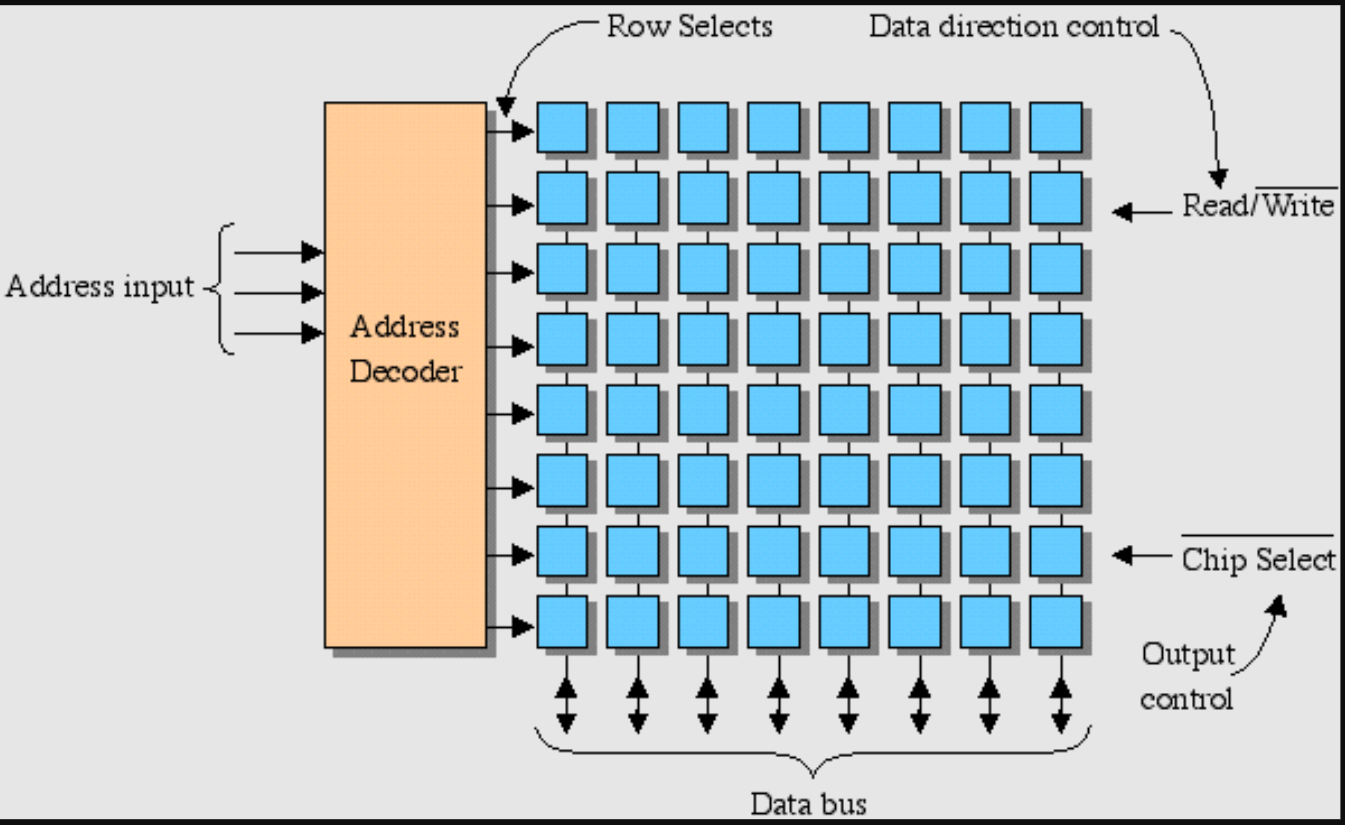
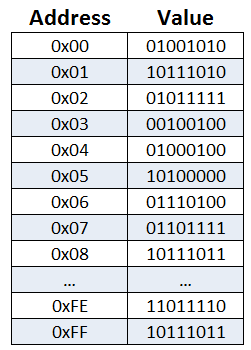
If a data value needs more than 8 bits, it spans multiple memory locations. This means that a single value can occupy several addresses. Each unique combination of address bits identifies one specific memory location in RAM. Although addresses are stored in binary, they’re typically shown in hexadecimal for easier reading.
Logical Memory
Modern CPUs use 64-bit data buses and 64-bit address buses. This means, in theory, a CPU could access up to \(2^{64}\) memory locations. If each location stores just 1 byte, that would equal roughly 18 million terabytes (\(10^{18}\) bytes) of memory!
Of course, that’s not the case! Even the most powerful computers today have only a few hundred gigabytes of RAM. The operating system manages this difference by mapping logical addresses (what the programs running on CPU thinks exists) to physical addresses (the actual locations in RAM).
Virtual Memory
Virtual memory or logical memory is an abstraction of the memory location created by the Operating system to give the “illusion” to any program executing on the CPU that there is a lot more memory than there actually is! The job of the OS to map this virutal memory to physical memory and make sure it updates the mapping table.

Virtualization
Let’s return to the restaurant analogy. Imagine the restaurant is completely full, and every bit of workspace is being used by the sous-chefs. New customer orders keep coming in, and Chef-OS needs more room to prepare urgent meals.
To make space, the chef notices that some sous-chefs are only prepping ingredients for tomorrow, not cooking right away. So, he decides to move them to the cold storage room at the back to free up tables for the urgent dishes. The sous-chefs set up a small workspace there and continue working, though it’s not ideal!
In computing, this is similar to virtual memory or swap space. When the system runs out of RAM, it borrows space from the storage drive to keep processes running. It helps temporarily, but relying on it too much can slow things down — and just like the sous-chefs, your computer won’t like working in those conditions!

OS and Hardware - summary
The OS manages similar interactions with all hardware components. The following table summarizes these relationships.
| Component | Physical Interaction | OS Role |
|---|---|---|
| CPU | Switches billions of transistors via voltage changes | Executes OS instructions, manages timing |
| RAM | Stores charge states (1s and 0s) | OS allocates and tracks memory |
| Storage | Moves electrons or magnetic fields | OS handles file systems and I/O commands |
| Buses | Carry voltage signals between chips | OS schedules and coordinates data transfers |