Installing OS
Single boot, Dual boot and Virtual machines
Most commercial computers come with an operating system pre-installed on the disk. While most users keep and use the OS that comes with their computer, it is possible to upgrade, change, or install another one. The three most common operating systems for personal computers are Microsoft Windows, macOS, and Linux.
Single boot 🪟
This is a mode where only a single operating system is installed on a system. When the computer is turned on, it’ll boot into that operating system.
Clean Installation
A clean installation is an installation where the target disk partition is erased prior to actual installation. A clean installation should be carried out:
- When a computer is passed from one person to another.
- When the OS that was installed is corrupt.
- When the primary hard drive has been replaced
To perform a clean installation, a series of common steps are done. Order those steps and validate your understanding!
Dual boot 🌓
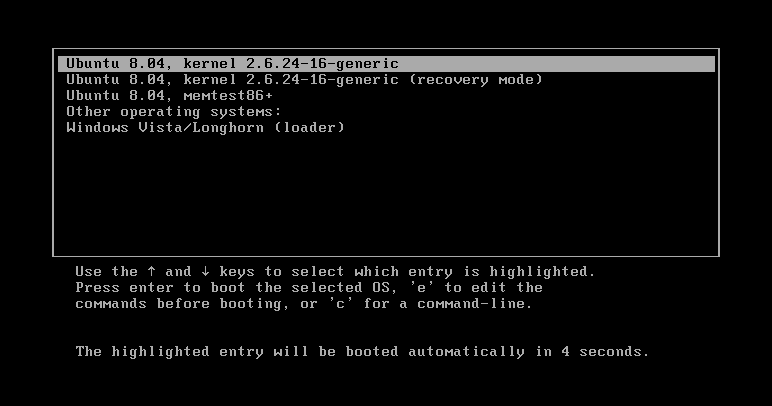
Exploring or installing multiple operating systems can offer flexibility, learning opportunities, and practical benefits for different types of users. Dual booting indicates installing a second operating system on a separate partition of a hard drive. On boot, a prompt will allow the user to choose the OS. To switch the OS, a reboot is required.
Pros
- 🧠 Learn new systems: Users can experiment with Linux while still keeping access to their Windows OS.
- 💾 Access more software: Some applications are developed exclusively for specific platforms.
- 🧪 Test across systems: Developers can natively test software designed for multiple OSs, and web designers can preview sites using native browsers.
- 🎮 Game safely: Gamers can test or tweak setups without risking their main Windows installation. 😄
Cons
Disk space Perhaps the biggest factor when setting up multiple operating systems on a personal computer is the available disk space.Running multiple operating systems means the need to allocate space for each operating system and each systems file storage.
Switching between operating systems User tend to find hard to move the work environment between multiple OSs (running application and files).
Virtualization 🪆
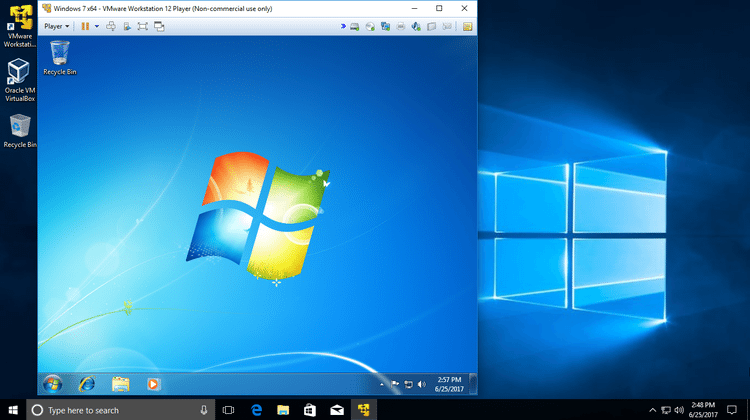
This is no the same thing as Memory Virtualization which we learnt about when a system runs out of RAM. Virtualization is the process of hosting virual operating systems within a host operating system.
Pros
🧳 Save space: Virtual machines help reduce the physical space required for separate hardware setups.
💼 Business-friendly: Switching between operating systems is quick and seamless, making virtualization ideal for workplace productivity.
⚙️ Efficient resource use: High-performance servers can host several virtual machines, each dedicated to specific tasks or departments.
Cons
*🐢 Performance trade-off: Running several virtual machines can slow down the host operating system, especially on lower-end hardware.