
Milestone 5: Final Presentation#
In this milestone, you will give an in-person demonstration of the functionality of your entire project. This milestone will also be an assessment of the quality of the code and documentation of your project.
This documented adapted with permission from Vik’s lovely notes on the App Dev requirements for this milestone. Make sure you read those too!
🔍 Context#
Milestone 5 is the culmination of your App Dev III project. In Milestone 4 you incorporated your reTerminals as IoT devices within an Azure IoT Hub instance.
This milestone will test the integration of all your subsystems with your multi-platform application. Your reTerminal devices should robustly measure data, send regular telemetry, and act upon instructions from your applications, reTerminal dashboard, and Azure IoT Hub control commands.
🎬 Demo Format#
Note
Your scheduled demo slot is also your final deadline for this milestone.
During your in-person demo, your team will demonstrate the complete system functionality. All team members must be present. You will be asked to go through each of the requirements stated above and will be graded on the spot. Failure to meet any of the criteria will result in deductions, and you will not have any opportunities after the demo to fix them.
Presentation Schedule#
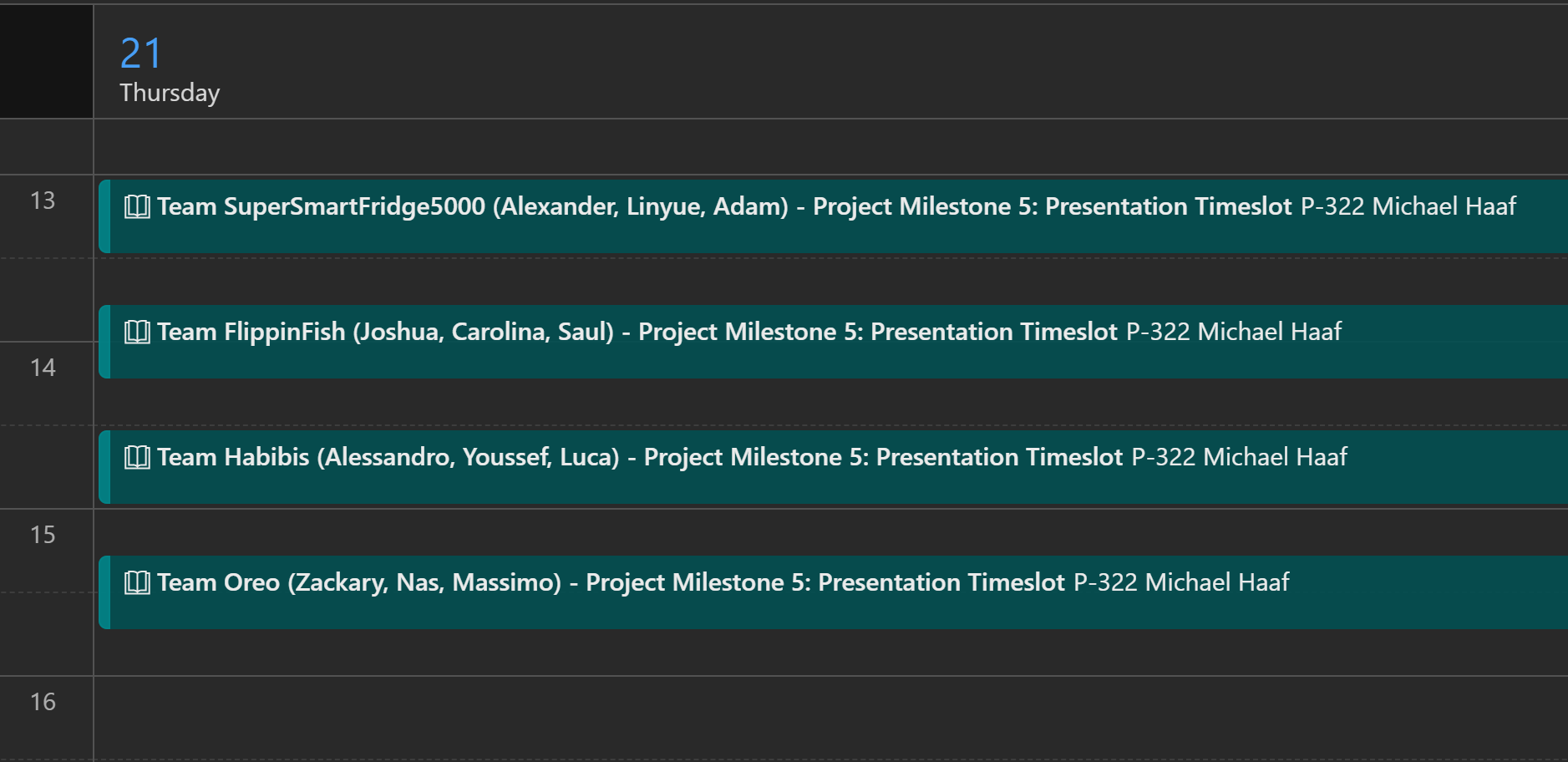
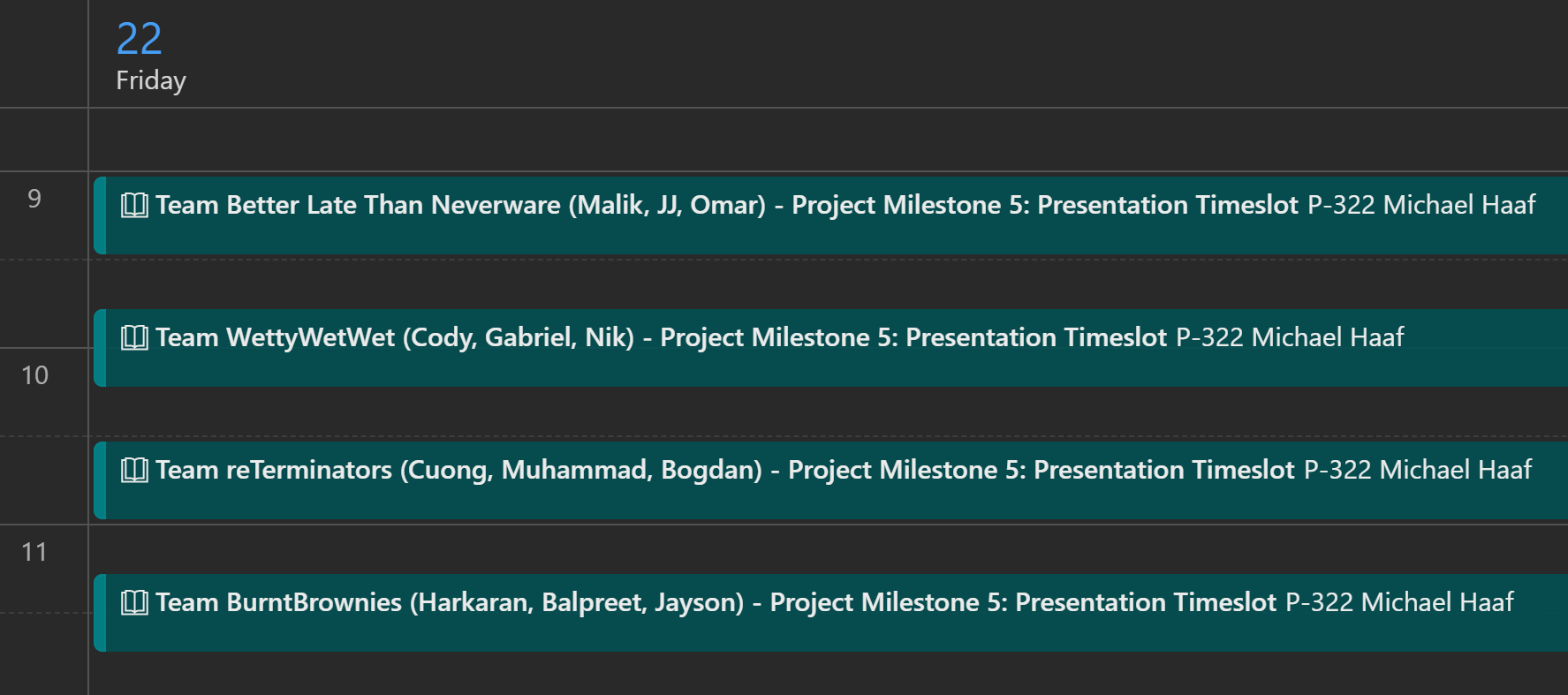
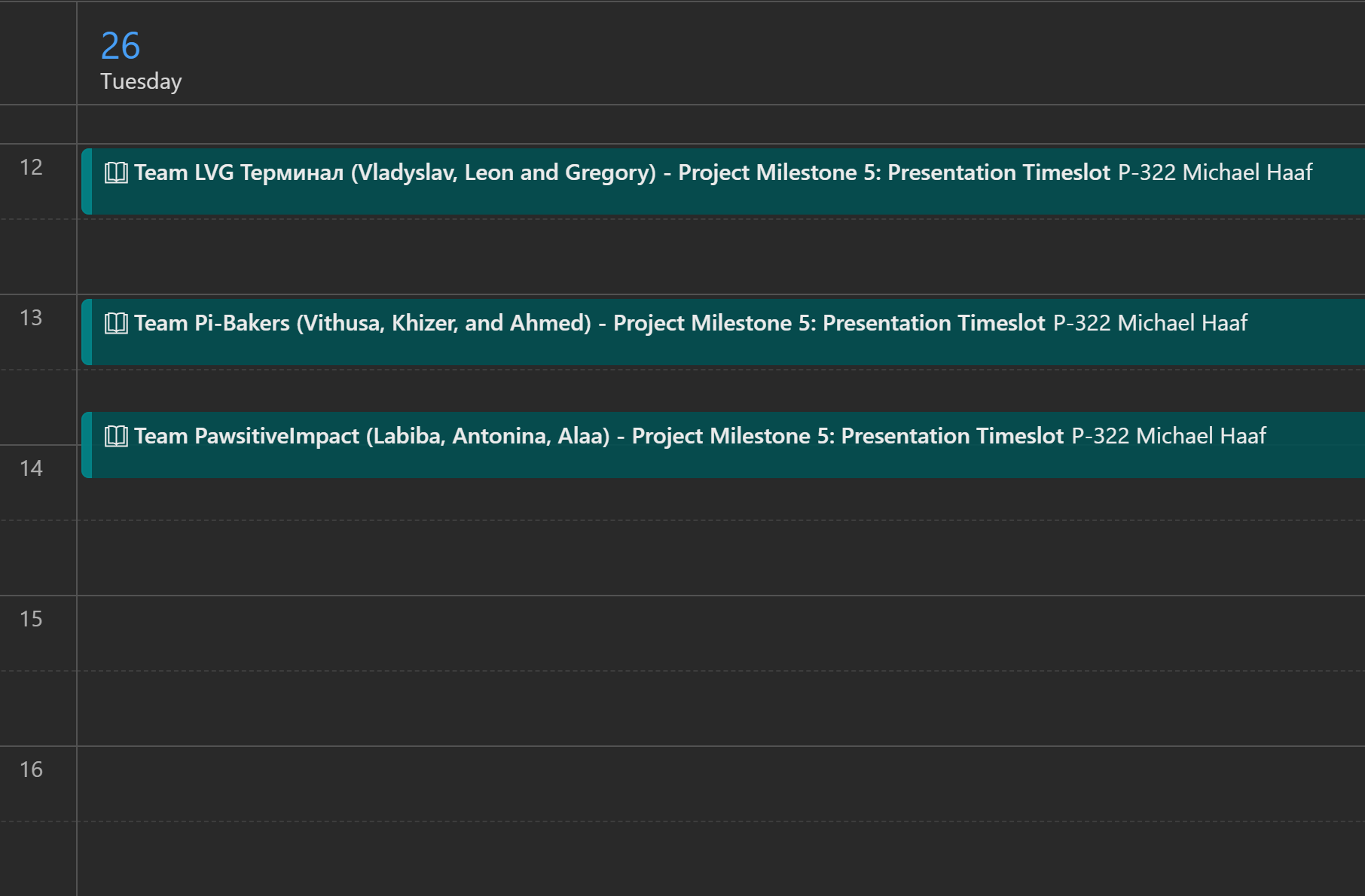
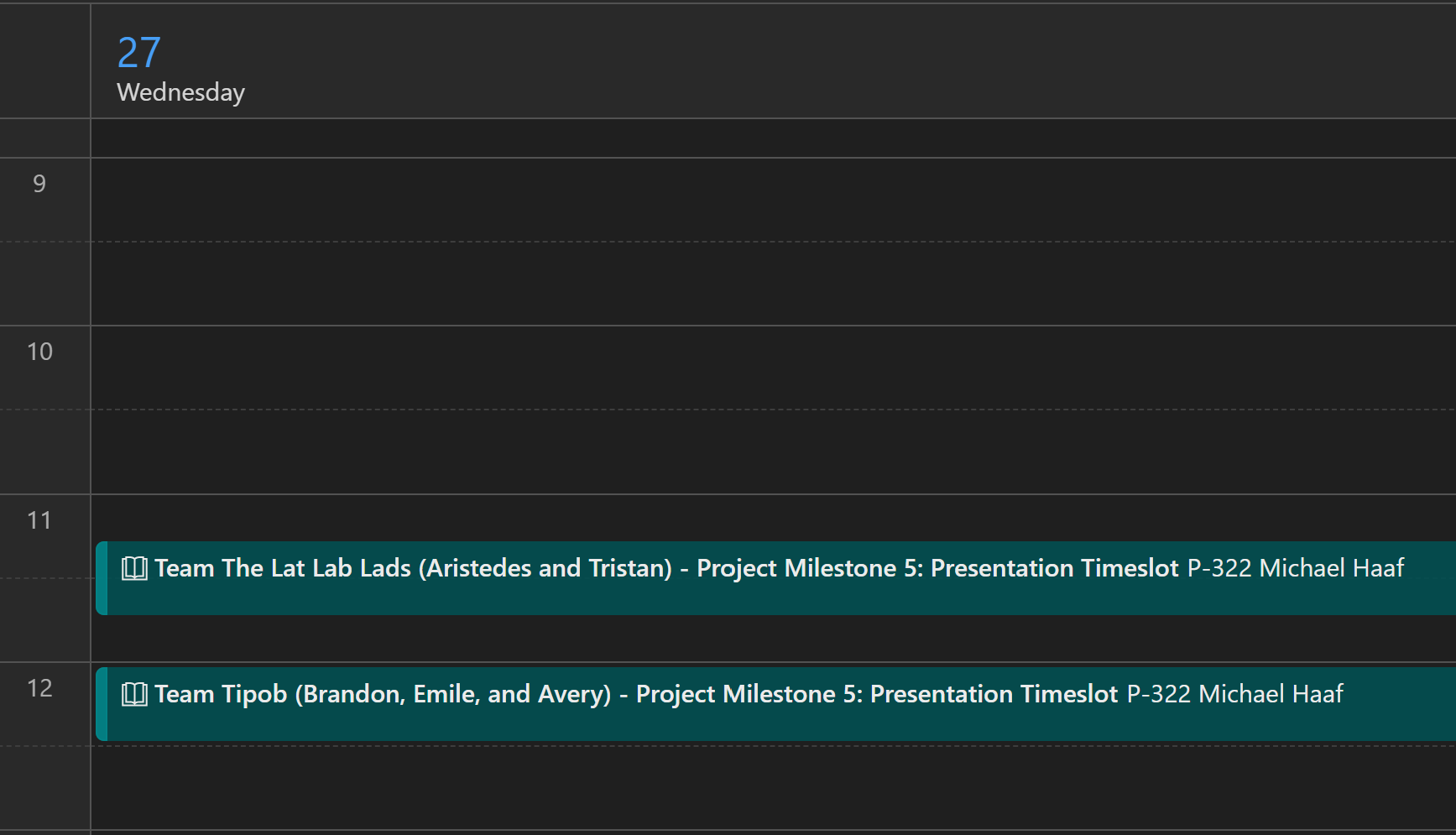
Note: the time on the left hand side of each image is in 24h format. There is space for more presentations on May 26/27 if teams need more time, see ❓FAQ.#
✅ Requirements#
Note
These are the requirements for Connected Objects. Vik and I might have different ways we grade you. Below is what will determine your Connected Objects grade.
What follows is an explanation of the requirements.
You can see the weight of these requirements in the grading-rubric section.
Presentation#
The bulk of your marks for this milestone will come from the in-person presentation taking
place on May 21/22/26/27 (see schedule).
Demo: readiness, flow, and organization#
Your team should be ready to present by the time of the beginning of your demonstration. There are a few components to this:
Your team must have a plan for how to present the main features of the subsystem and the app
Vik and I will ask questions throughout, but you should not need use to prompt you to show off what your subsystems can do. Have a plan to show us what you’ve done already!
All team members must be able to quickly demo subsystem features when asked
Recommendation: practise in advance! Be familiar with how your system and devices work beforehand.
Pizzazz: does your project feel like it solves real problems? Does it work well? Is it interesting? Have you added cool features?
IoT integration#
You have already set up your reterminals to use the same IoT Hub as your application
Your reterminals are using the correct connection string / device id
That IoT Hub is ready to use (you don’t run into message limiting issues)
Able to quickly query Azure using CLI when asked:
Recommendation practise using the Azure CLI cheatsheet commands
For example, during the demo, I will ask you to:
call the
is_onlinedirect method using Azure CLI, observe the status responsecall the
control_actuatordirect method using Azure CLI on one or more of your actuatorsObserve the IoT Hub status of your devices using the
monitor-eventsAzure CLI command., confirm that there are live sensor readings.
Subsystem functionality#
Device autostart/quickstart: you should be able to quickly start your reterminal
That means: we shouldn’t have to watch you set up the several terminal instaces required to start the backend/dashboard/etc.
Ideally, your reterminals should autostart and be connected to the IoT Hub and ready to use
Alternatively, wrap the startup into a single script that can be quickly executed over SSH.
your reTerminal backend/dashboard apps should be robust, not crash
Live readings for all sensor devices
Event-based readings can be triggered and observed in reTerminal dashboard / IoT Hub / application
Telemetry readings can be observed in reTerminal dashboard / IoT Hub / application
Telemetry readings should be quick enough to observe during the demo (recommendation: 30 seconds or less between telemetry readings)
Good sensor calibration and unit choices
All telemetry/readings should have units of measurements and calibration that make sense.
Live actuator usage
Actuators should be triggerable using the reTerminal dashboard
Actuators should be triggerable using IoT direct methods
Actuators should be triggerable using the App Dev app
After the demo#
After the demo, you will need to return all of the devices you have borrowed. That includes:
the ReTerminal Kit
The kit must be returned in its original condition – ensure all pieces are present and put away neatly.
all extra external devices you have borrowed
all extra wires/cables/accessories/etc.
Repository content#
This part of the requirements is an assessment of the code committed to your project repository.
Git Integration#
All work must be merged to the
mainbranch and easily accessibleALL branches incorporated in
main, and removed afterwards, OR removed if not usedNOTE: I’m not expecting perfection, but a good effort to clean up the branches is expected.
Git history shows good coordination (meaningful commit messages, proper branching)
NOTE: I’m not expecting perfection across ALL of your commit history. I’m looking to reward teams that put some effort into this, and give medium-ish marks to teams who didn’t.
.gitignoreproperly configured (i.e. no.venv/committed)
Code Quality#
Clean, well-organized subsystem code. There should not be many linter or formatting issues.
Aim for modular, non-repetitive code.
Not expecting perfection, but effort.
Documentation#
Your repository must include complete setup instructions in the README:
Note
Your main branch root-directory README.md does not itself need to contain all of the information below, but it
must be an access point for where to find that information.
Vik & I should be able to open the main link to your repository and immediately be able to find links and/or information about your application, subsystem, and IoT documentation.
You may find the example projects from previous years useful for seeing what to do/what not to do.
Subsystem documentation for devices
Setup Instructions: How to run the app per subsystem
Device wiring, IoT setup
Usage Instructions: How to run the app per subsystem
Instructions for setting up autostart / quickstart on a new machine
Dependencies installation steps
Environment variable names and where to set them / how to source them before running programs
Protocol type (Digital/Analog/Serial/UART/I2C/USB/etc.) for each device
Datasheet linked for each device.
Known issues or limitations
The goal is that another team or instructor should be able to clone your repo and configure their own IoT Hub to test your app with your suite of devices.
📊 Grading Rubric#
The weights for each of the requirements above is shown below.
Presentation#
See the table below for the rubric I will be applying during your presentation. See the relevant section above for explanation of the main categories.
Note
The exact weights for each of these rubric items is subject to small changes.
Demo: readyness, flow, and organization |
20 |
IoT integration |
20 |
Subsystems functionality |
20 |
|---|---|---|---|---|---|
IoT Hub wasn’t ready for use by all 3 team members |
-2 |
Direct methods not implemented |
-5 |
1 sensor/actuator not working properly |
-3 |
reTerminal app crashes. |
-2 |
Direct methods partially implemented with issues |
-2 |
2 sensors/actuators not working properly |
-6 |
Minor device setup issues |
-2 |
Significant issues with live IoT readings |
-5 |
3 or more sensors/actuators not working properly |
-1 |
Connection string setup issues |
-2 |
Some issues with live IoT readings |
-2 |
1 or 2 issues with sensor calibration/unit choices |
-3 |
Device autostart/quickstart not implemented, so time taken to initialize all 3 devices |
-2 |
Multiple sensor calibration / unit choice issues |
-6 |
||
Issues running multiple devices on same IoT Hub |
-2 |
No integration with reTerminal dashboard |
-5 |
||
Presentation plan/configuration not ready in advance |
-2 |
Issues with integration with reTerminal dashboard |
-2 |
||
Able to quickly demo device features when asked |
0 |
Direct methods to control actuators with UI or app-side rules |
0 |
||
Able to quickly query Azure using CLI when asked |
0 |
Live readings for all sensor devices |
0 |
||
Lack of familiarity with devices during demo |
-2 |
Able to determine if device online/offline using direct method call |
0 |
||
Unable to quickly query using Azure CLI during demo |
-3 |
Good sensor calibration and unit choices |
0 |
||
Not ready to return all borrowed devices at end of lab |
-3 |
Code Quality, Git, & Documentation#
See the table below for the rubric I will be applying after your presentation. See the relevant sections above for explanation of the main categories.
Points |
Criteria |
|---|---|
18-20 |
Clean, well-organized code. TypeScript types properly defined and integrated (union types). Meaningful commit messages showing good coordination. Complete README documentation. No console errors. |
15-18 |
Generally clean code with minor issues. Most types defined. Git history adequate. Documentation mostly complete. Minor console warnings. |
10-15 |
Acceptable code with multiple issues. Some type conflicts. Poor Git coordination. Incomplete documentation. Console errors present. |
0-10 |
Poor code quality. Major type conflicts. No Git coordination. Missing documentation. Major console errors. |
Peer & Self Assessment#
We use the same Peer & Self Assessment form as in App Dev III; please see the relevant instructions here
However, because the Presentation for Connected Objects has individual components (e.g. you will not be penalized if your partner’s devices don’t work), there will be no multiplier – there will simply be a raw number of marks added to your total.
📝 Summary#
Component |
Points |
Notes |
|---|---|---|
Presentation: demo/readiness/flow |
20 |
|
Presentation: IoT Integration |
20 |
|
Presentation: Subsystem |
20 |
|
Code Quality, Git, & Documentation |
20 |
Clean code, types, Git coordination, README |
Project Subtotal |
80 |
Shared grade for entire team (with exceptions, see IoT Int. and Subsystem) |
Peer & Self Assessment |
10* |
See above |
TOTAL |
90 |
Project Subtotal + Peer Points |
❗Reminder: Example Projects#
All of you have been re-invited to the organizations below. Click the link to accept the invite if you have not already.
These are good references for Documentation quality. What do these projects do well to convey how to use the systems? What can be improved upon? Etc.
Winter 2025 projects: orgs/jac-cs-capstone-w25
Here, each team came up with their own subsystem and device capabilities.
This will be a good reference for seeing what different ideas are possible.
Winter 2024 projects: orgs/jac-cs-capstone-w24
In this semester, ALL teams had the same subsystems (Plant, Geo, and Security).
Here, you can see polished ideas for subsystems.
I can particularly recommend the
CropCareproject – very high quality.
❓FAQ#
I may add more FAQ here if I get more questions:
Question
Q: Our team needs more time! What should we do?
A: There are time slots you can book on Tuesday the 26th and Wednesday the 27th. Message Vik or myself.