
Azure Blob Storage#
Storage Accounts#
As one can imagine, there are many types of storage accounts in Azure. In this course we’ll explored Blob Storage (object storage).
To know more about the other storage services offered by Azure see Introduction to Azure Storage.
Blob Storage#
Azure Blob storage is an object storage solution optimized for storing massive amounts of text or binary data.
Blob storage is designed for:
Serving images or documents directly to a browser.
Storing files for distributed access.
Streaming video and audio.
Writing to log files.
Storing data for backup and restore, disaster recovery, and archiving.
Storing data for analysis by an on-premises or Azure-hosted service.
Storage Structure#
Blob storage has the following structure:
Storage account: provides a unique address that includes your account name.
Containers: organizes a set of blobs, similar to a directory in a file system.
Blobs: the file being stored.
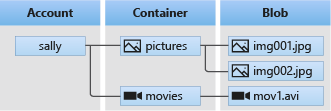
Structure of Blob storage From Microsoft Docs, introduction to Azure Blob storage.#
Creating a Storage Account & Container#
For details on how to create a storage account see Create a storage account.
The default setting for creating a Storage Account and Blob Container are sufficient for this course.
However, if you would like your containers to have sub-folders, see the next section.
Hierarchical Directories & Data Lake Storage#
By default, Blob storage has a flat file structure. This means that all blobs (files) sit at the same level inside the container.
Azure Data Lake Storage Gen2 is built on top of Blob storage, but offers additional features designed for big data analytics.
In particular, it offers hierarchical directory organisation at a marginal price increase.
This simplifies storage retrieval and organisation so it will be the preferred storage option for IoT telemetry data.
For more information see Introduction to Azure Data Lake Storage Gen2.
Note: A Blob storage container is the Azure equivalent of an Amazon S3 bucket.
Blob Storage SDKs#
As usual, Azure provides a SDK to interact with blob storage.
Python SDK#
Python SDK documentation overview for:
Getting started.
Key concepts.
Examples.
Quick Links Package (PyPI) | API reference documentation | Product documentation | Samples
.NET SDK#
.NET SDK documentation overview for:
Getting started.
Key concepts.
Examples.
Quick Links Package (NuGet) | API reference documentation | REST API documentation | Product documentation
Notes on Blob Storage SDKs:#
Blob name is usually the path to the blob object relative to the container.
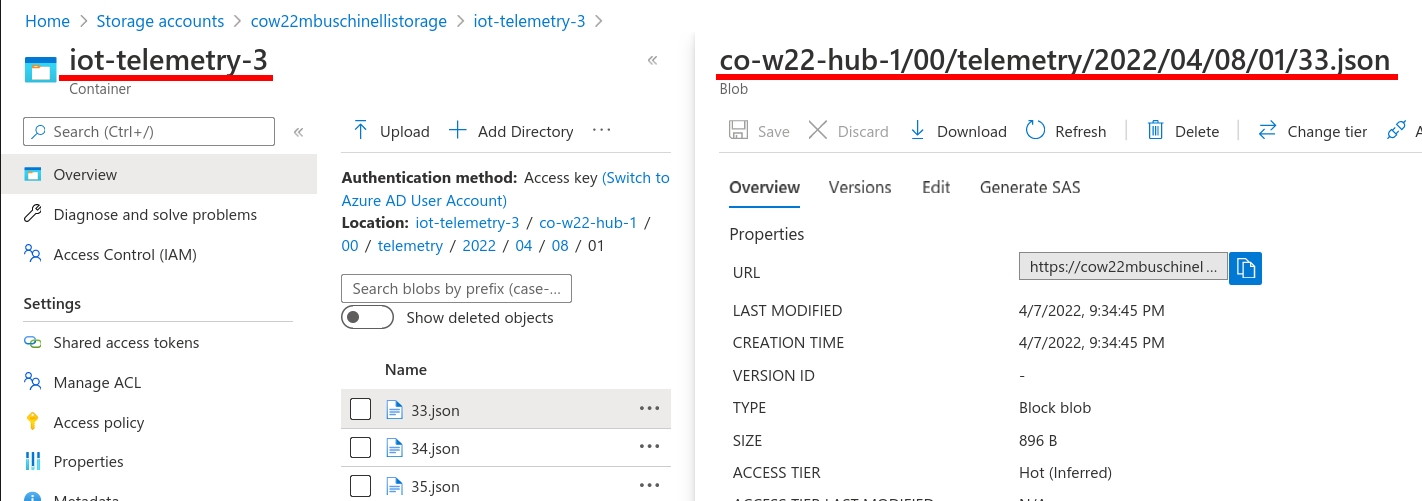
Here we have the container name on the left and the blob name on the right.#
Blog Storage & Event Hubs#
When ingesting EventHub events using the Nuget package Azure.Messaging.EventHubs, you might require a BlobContainerClient.
To create an instance of a BlobContainerClient , you must provide the following information:
Storage account connection string
Follow steps bellow (from section: Get a connection string for the storage account.)
Navigate to your storage account in the Azure portal.
In the Security + networking section, locate the Access keys setting.
To display the account keys and associated connection strings, select the Show keys button at the top of the page.
Blob Container Name.
Simply the name of the container you created inside the storage account.
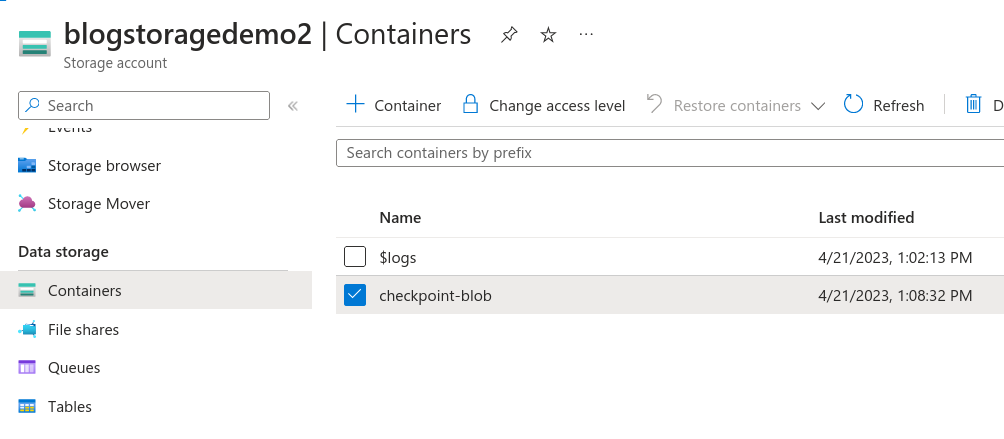
Here we have checkpoint-blob as the name of the container.#
References#
Introduction to Azure Blob storage by Microsoft.
Create Azure Data Lake Database, Schema, Table, View, Function and Stored Procedure, by: Ron L’Esteve
Github Repo w/ Samples: Azure Storage Files Data Lake client library for .NET
See the videos below.