
Asynchronous progamming in Python#
Asynch with asyncio#
The library asyncio enables code to be run concurrently: Tasks share the execution
thread while appearing to be executing in parallel.
Asyncio API:
Coroutines and Tasks (good intro to asyncio).
In-depth guide:
Async IO in Python: A Complete Walkthrough by realpython.com.
Video Summary:
How To Easily Do Asynchronous Programming With Asyncio by ArjanCodes
Concurrent vs Parallel#
It’s important to note that concurrent code does not necessarily mean parallel.
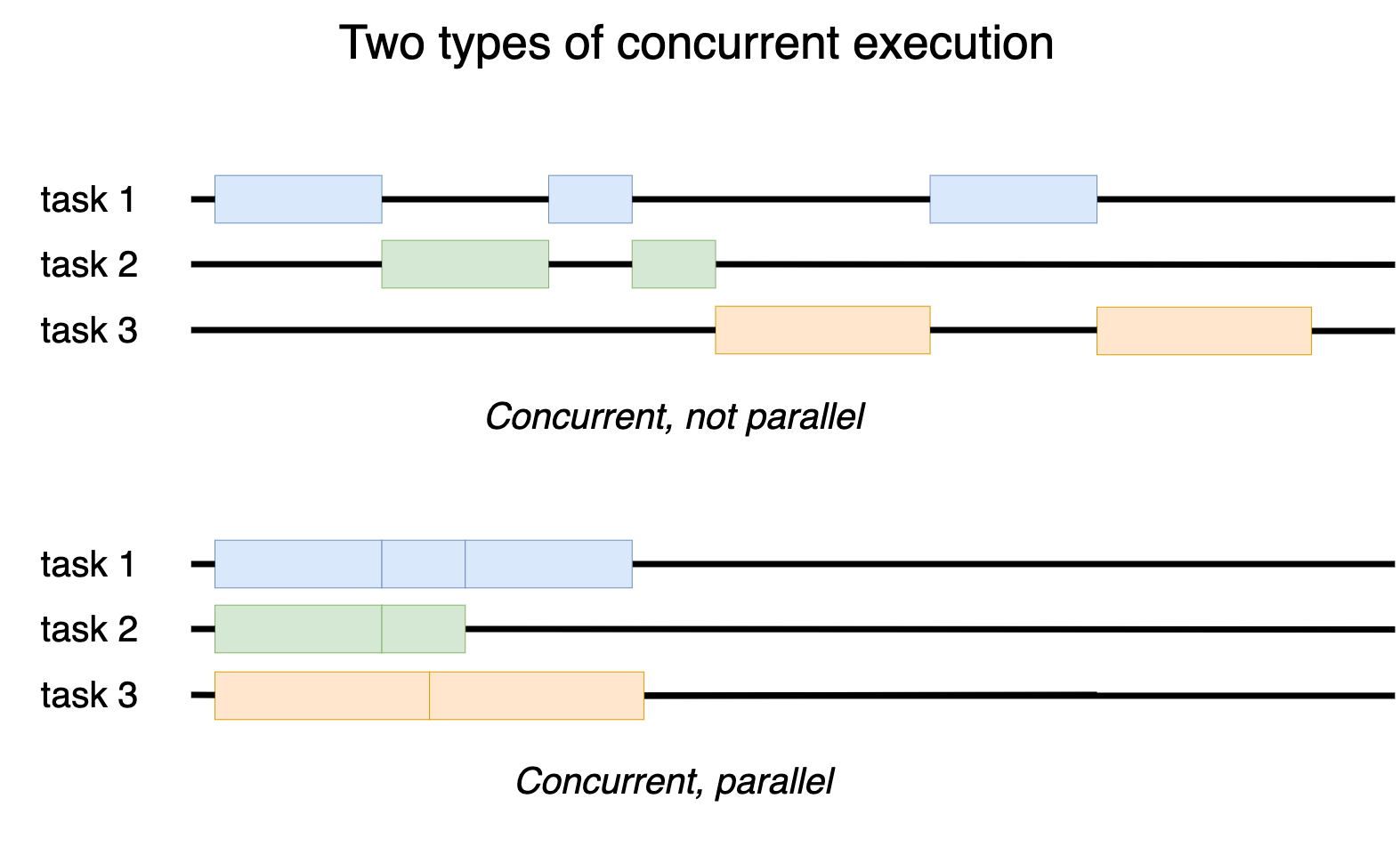
Concurrent does necessarily mean parallel execution. By Ten thousand meters
In Python, the only way to run parallel code is to use multiple CPU cores by running multiple Python interpreters that interact. See multiprocessing module.
Asyncio is used to run multiple tasks or multiple threads concurrently but never at the same time (in parallel).
Synchronous vs Async Execution#
In typical programming, most tasks and processes are synchronous, meaning, they run one at the time, always waiting for the previous taks to finish
Synchronous is disadvantageous when there are many tasks that need to wait for external input or output before it can proceed. For example:
The code was asked to sleep.
Waiting for a HTTP response.
Waiting for a Database call.
Waiting to write to a file.
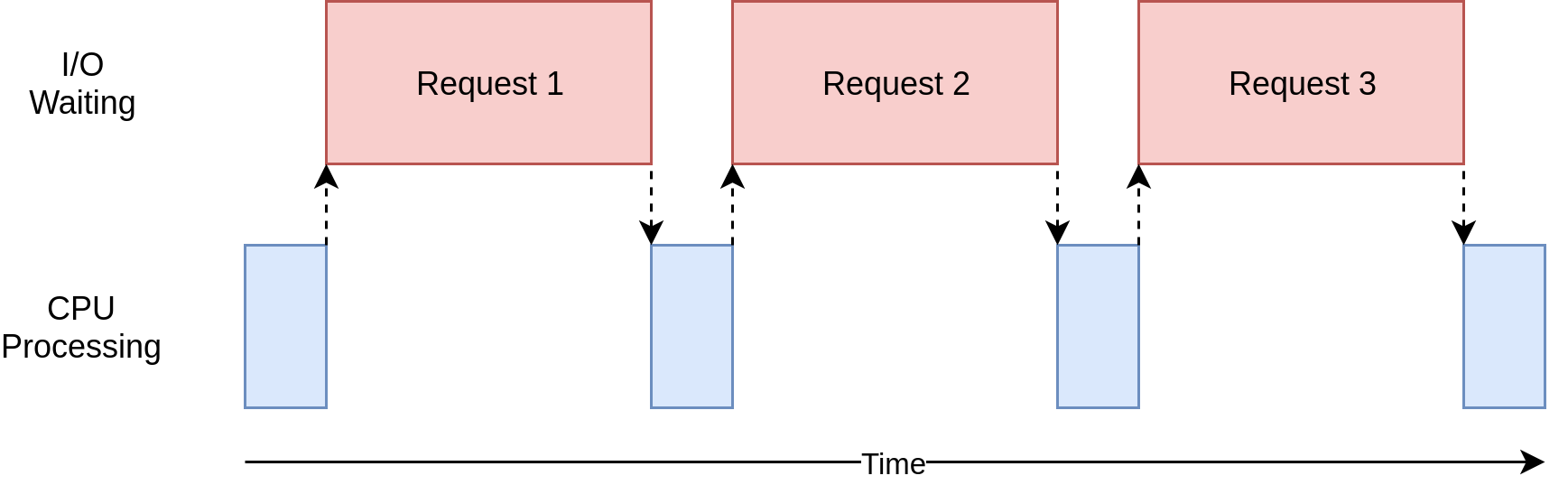
Synchronous code execution by RealPython.com
Asynchronous execution enables the execution of the next task while waiting for the external input/output.
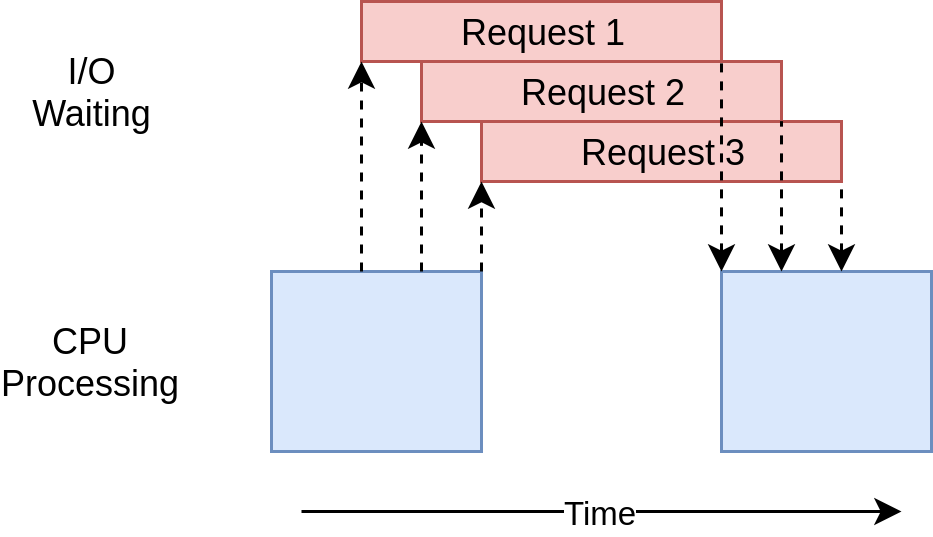
Asynchronous code execution by RealPython.com
Note that the amount CPU processing (blue area in the diagrams above) is the same in both sync and async executions.
However, the async execution spends less time waiting idle.
Asyncio Tasks#
asyncio uses the concept of tasks to manage and share the CPU processing time.
Each
taskmust explicitly yield (or pass) execution time back to the main loop so that the next task can start/continue.

Tasks yielding execution time with the await keyword. By
Adafruit.com
In the image above, Task 1 (running function f()) yields execution time to Task 2
(running function g()) by using the await keyboard and vice-versa.
Coroutines, Tasks & Event Loop#
In Asyncio, there are 3 types of awaitable objects:
Coroutines
Tasks
Futures
Coroutines#
Coroutines are functions that are awaitable.
They must be declared with the async keyword
async def countdown(task_name, seconds):
    for i in range(seconds, 0, -1):
        print(task_name, i)
        await asyncio.sleep(1)
    print("done!")


async def main():
    await countdown("simple count", 4)


asyncio.run(main())

""" Output
simple count 4
simple count 3
simple count 2
simple count 1
done!
"""
In the example above, countdown(), asyncio.sleep() and main() are coroutines.
countdown() and asyncio.sleep() were called with await , however, main() was
called with asyncio.run()
In asyncio, all awaitable objects must run inside an event loop.
The method
asyncio.run()creates a “top-level” event loop
Tasks#
Tasks are used to schedule coroutines concurrently.
Once a task is scheduled, it will run as soon as the event loop is available.
Tasks are scheduled (wrapped) with
asyncio.create_task()In order to run a task to completion, it must be awaited.
async def main():
    # Scheduling and starting tasks
    taskA = asyncio.create_task(countdown("task A", 3))
    taskB = asyncio.create_task(countdown("task B", 2))

    # Doing something else while they run
    await asyncio.sleep(1)
    print("Everything, everywhere, all at once")

    # Awaiting for tasks to complete before ending main()
    # Try running this code without awaiting
    await taskA
    await taskB


asyncio.run(main())

""" Output
task A 3
task B 2
Everything, everywhere, all at once
task A 2
task B 1
task A 1
done!
done!
"""
Instead of creating Tasks and awaiting them individually, it’s possible to run multiple coroutines concurrently and wait for all of them:
async def main():
    # Running and awaiting multiple coroutines

    await asyncio.gather(countdown("task A", 4), countdown("task B", 3))

    await asyncio.sleep(1)
    print("Everything, everywhere, all at once")


asyncio.run(main())
"""
task A 4
task B 3
task A 3
task B 2
task A 2
task B 1
task A 1
done!
done!
Everything, everywhere, all at once
"""
Futures#
A Future in Asyncio is the equivalent of a Promise in JavaScript.
It is rare that developers need to use a Future directly.
Diving Further & References#
The following are excellent resources for learning more about Asyncio:
Async IO in Python: A Complete Walkthrough by RealPython.com